CheckNumber.AI
· 6 min read
Match Bulk Phone Check Results Back to CRM Records
Build a local source-to-number map, handle shared numbers, and reconcile exported check results to the right CRM records.
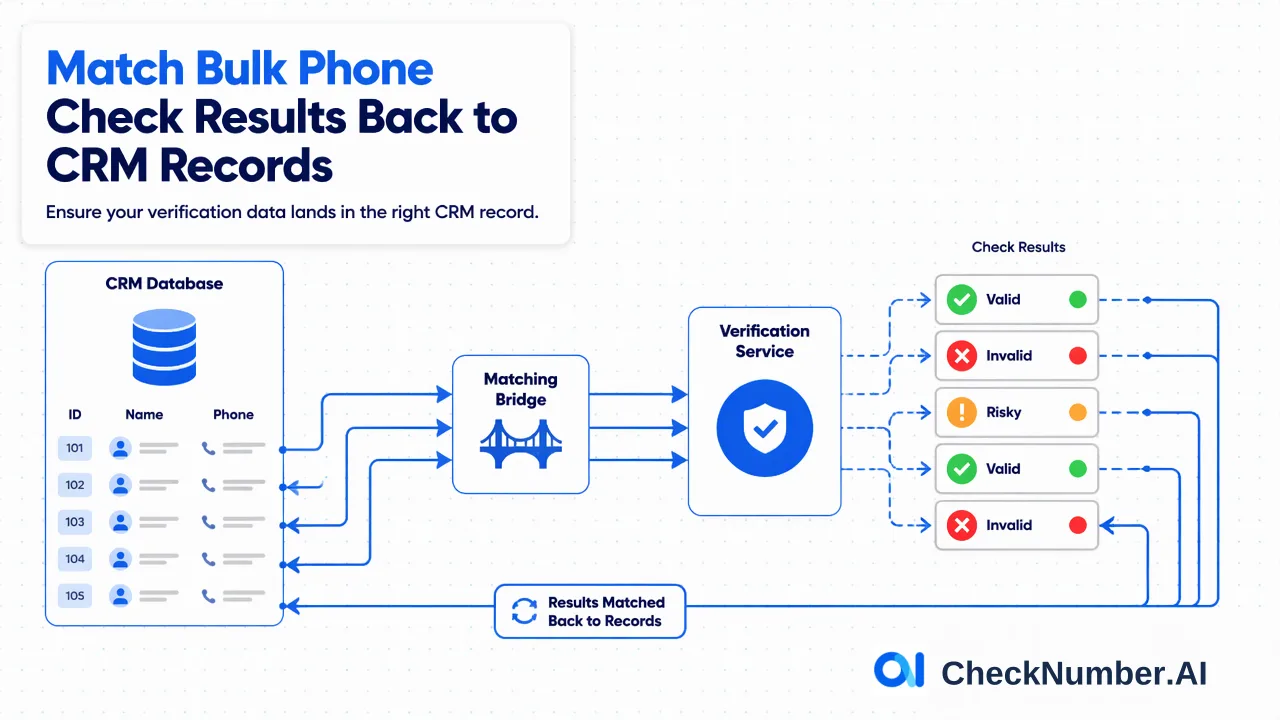
To match bulk phone check results back to CRM records, assign stable record IDs before preparing the upload and maintain a local map from each normalized number to every source record. Join the exported results using the checked number and that map rather than row position. Review unmatched and many-to-one cases before changing CRM fields.
The matching problem begins before the upload
A phone-check export answers a question about submitted numbers; a CRM stores people, organizations, permissions, and history. Those objects are related, but they are not the same table. One CRM record can have multiple phone values, and one number can appear on multiple records. Normalization or deduplication may also change the count and order of submitted rows. If the team plans to paste returned rows over the original CRM export by spreadsheet position, even a clean check can update the wrong contact.
Create a stable internal record key before transforming anything. If the CRM has a durable record ID, export it with the phone fields. If the source lacks one, assign a temporary key in a protected local staging table and retain the original export. Include the phone-field identity when a record has several numbers. The staging table is owned by the team; it is not a claim that CheckNumber.AI accepts custom IDs in every product or returns them in a particular schema.
Construct a number-to-record mapping
For each phone value, keep the source record ID, source field name, original text, normalized number, country context, and preparation status. Create a separate lookup table keyed by the normalized number that lists all corresponding source record IDs and fields. A unique checked number may relate to several people, such as a company switchboard. Do not merge those contacts simply because they share the number. Conversely, a person with a mobile and an office line needs two possible number-level results.
Prepare the bulk input using the current product guidance. The documented CheckNumber.AI phone-list workflow uses CSV or TXT and one number per line with country code, with one country per file. The API documentation should be consulted for the current supported workflow and applicable limits when integrating programmatically. This article deliberately avoids assuming a request payload, result field name, or response envelope that has not been verified for the selected checker. Keep the upload file, local map, selected product, and check date associated with one internal batch identifier.
Normalize the join key consistently
The number sent for checking and the number used to look up a result must be represented consistently. For example, optional display punctuation and the optional leading plus sign should not create separate local identities when the underlying country-coded number is the same. Use one normalization routine for the staged upload and for the result import, and preserve raw values alongside normalized keys. Test a sample round trip before processing the whole export.
Never rely on result row order. A service may return rows in a different order, and a team may intentionally deduplicate the input. Instead, read the number-level result, derive its normalized key, and join through the local mapping. If a result cannot be matched to exactly the intended key, hold it for review. If several result rows map to one key but disagree, investigate rather than picking the last row. If one result maps to many CRM records, distribute the signal carefully while preserving each record as a distinct entity.
Apply a product-specific signal with the right meaning
Different CheckNumber.AI products provide different signals. A phone validity check, an activity signal, and a platform registration check should not be stored as if they were one universal Boolean. Record which named checker produced each result and the date it was obtained. A platform-specific registration signal can inform channel planning at check time; it does not verify identity, ownership, consent, future reachability, or message delivery. An activity signal can support prioritization but cannot promise a response.
Decide how the CRM will represent a review outcome before writing values back. A team may use an internal status such as review needed or checked on date, but those are suggested CRM labels, not product output fields. Do not overwrite a consent record, verified contact preference, or a human-confirmed phone field merely because a check returned an uncertain result. Keep the raw exported result and the local interpretation separate so later reviewers can see what the service returned versus what the team decided.
Reconcile exceptions and make updates reversible
Run counts at every stage: source phone values, excluded or ambiguous values, unique uploaded numbers, returned rows, matched result keys, unmatched keys, and CRM records proposed for update. These counts will differ for legitimate reasons. The important test is that each difference can be explained by a documented mapping or review decision. Sample shared numbers, multiple phone fields, country splits, and missing values.
Before a bulk CRM update, produce a proposed-change file containing record ID, phone field, previous internal status, new internal status, source batch, and reviewer decision. Keep the source data protected and follow the organization’s retention policy. Use a reversible update process so a mapping mistake can be corrected. Teams can review the Number Checker product for a suitable number-level signal, then implement the CRM reconciliation as their own controlled data workflow. The value of the check depends on making that final association correctly, not on how quickly rows can be pasted.
For each proposed update, have a reviewer confirm that the source ID still exists, the intended phone field is unchanged since export, and the batch belongs to the same country and product. If the CRM record changed meanwhile, pause the update and re-evaluate the mapping.
FAQ
How can teams join results when upload rows were deduplicated?
Keep a map from each unique normalized number to all source record IDs and phone fields. Join the number-level result to the key, then expand it to the mapped records.
Can result row order be used as a CRM key?
No. Use stable source IDs and normalized number keys. Row order can change during preparation, deduplication, or export.
What should happen when several contacts share a number?
Retain each contact record. The same number-level signal may be associated with several records, but it does not prove they represent one person.
How should an unmatched result be handled?
Hold it for review, compare the raw and normalized numbers, and check the batch map. Do not update a CRM record from an uncertain match.