CheckNumber.AI
· 7 min read
Phone List CSV Formula Injection: Review Files Safely
A two-copy process for reviewing untrusted phone CSV data without altering the machine upload.
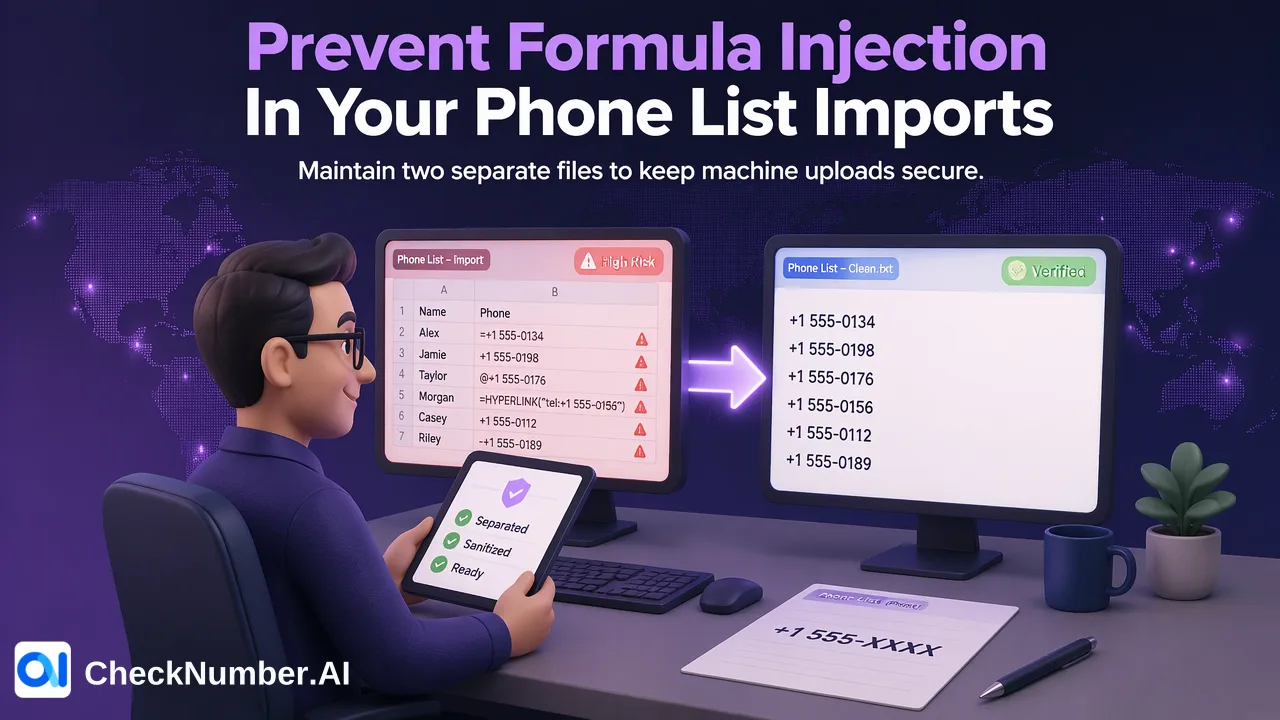
Phone list CSV formula injection is a risk when untrusted cell text is opened in spreadsheet software and interpreted as a formula. Review a protected human-readable copy, while generating a separate machine-upload copy containing only the intended phone-number text. A legitimate international number may begin with a plus sign, so do not remove that sign blindly; verify the final upload file as plain text before a bulk check.
Why a phone CSV needs two different reviews
A CSV is a text file, but a spreadsheet may treat its cells as more than text. The OWASP CSV Injection guidance explains that cells beginning with characters such as an equals sign, plus sign, minus sign, or at sign can be interpreted as formulas in some spreadsheet contexts. A malicious value may also use separators or quotes to place a dangerous character at the start of a new cell. That makes a casual double-click of an untrusted export a poor inspection method.
Phone data creates a special tension. A plus sign is a normal international-number prefix, yet plus is also on OWASP’s list of formula-triggering characters. Treating every plus-prefixed value as malicious would damage legitimate numbers. Treating every such value as safe because it resembles a phone number would miss the difference between the raw CSV cell and its displayed interpretation. The solution is to separate human review from machine submission and validate the content for each purpose.
This is a customer-side file-handling problem. CheckNumber supports bulk CSV or TXT list uploads, but the documented checking capability does not claim to protect an analyst’s spreadsheet from an untrusted source file. Keep the source export unchanged and perform review on a controlled copy.
Create a safe review copy for people
Start by labeling the source file as untrusted until its origin and contents are checked. Use a review workflow that treats imported fields as text instead of allowing automatic formula interpretation. Microsoft’s Power Query Text/CSV documentation describes how data type detection can be turned off so columns default to text. The exact review method should be tested with the spreadsheet version and file type the team uses; a display setting is not proof that a later save will preserve every character.
For a human review artifact, apply spreadsheet-specific mitigation according to the organization’s security guidance. OWASP notes that some escaping approaches can fail after a CSV is saved and reopened, and that a tab-based mitigation has a downstream data trade-off. This is why the review artifact should not be reused as the checker input. A safety prefix or escape character intended for a person’s spreadsheet may become part of the data that a machine processes.
Inspect suspect fields and cell boundaries. A row that contains a phone field plus arbitrary notes, embedded separators, or control characters deserves manual review. Keep the original line available for comparison, but do not ask an analyst to execute or click through warnings just to see it. If the review copy has changed the apparent phone text, use the source system to resolve the intended value.
Build a separate machine-upload copy from approved numbers
Generate the checker input from values that have passed source and country review, not from a spreadsheet’s saved review copy. Maintain a local mapping from each source record ID to the approved phone string. If normalization is needed, preserve both the original and prepared values. CheckNumber’s free dashboard Number Cleaner can normalize numbers to E.164 and remove duplicate and invalid entries before a paid check, but it cannot reconstruct digits lost in an earlier spreadsheet conversion.
For phone-list uploads, the documented format is one country per file and one number per line with the country code; the plus sign is optional. This means a customer can use a properly prepared number with or without that leading sign in the upload format. Do not strip the sign as a general CSV-injection fix, because the upload file and human review file have different purposes. A country-code number must still be checked for actual digits, country context, and unexpected text.
Use a plain-text inspection of the final machine file. Confirm that each line contains only the intended phone value in the selected upload format, no spreadsheet mitigation prefix, no formula text, no extra notes, and no unintended line breaks or separators. Compare a sample of lines with the approved working table and unchanged source. A file that looks correct in a spreadsheet can still contain altered underlying bytes.
Keep review and upload decisions traceable
A useful customer-managed review table tracks source record ID, original cell text, approved phone string, country, reason for any transformation, and whether the row is held. These are suggested local fields, not a promised product output schema. A row that cannot be resolved should stay out of the upload, rather than being coerced into a plausible-looking phone number.
CheckNumber’s product catalogue helps a team choose the phone check that matches the question, such as documented validity or named-platform registration. The CSV safety process itself does not establish either result. A well-formed upload only gives the checker an intended input. For API workflows, use the current API documentation for the selected supported product rather than assuming CSV rules are an API schema.
After a checker-specific export is available, match results to the approved phone mapping and then back to original record IDs. Do not rely on output order. If several contacts share one number, preserve their separate source and permission histories. A technical signal at check time should not be converted into identity or consent proof, regardless of how carefully the CSV was prepared.
Test the two-copy process before routine use
Create synthetic internal fixtures for a normal country-code phone value with a plus prefix, a value without a plus prefix, a malformed value containing additional text, and a row with separators or quotes in an unexpected place. These are review test cases, not actual check results. Verify that the human review process does not execute spreadsheet formulas and that the machine-upload file contains only approved phone text. The same source record should be traceable in both copies without copying review-only escape characters into the upload.
Reopen the review copy under the team’s actual spreadsheet workflow and inspect how suspicious text is handled. Then inspect the machine file with a text-oriented reader and compare its characters with the approved values. OWASP’s warning about save-and-reopen behavior makes this second pass important. If a workflow cannot reliably preserve or distinguish the copies, change the customer-side process before checking production contact data.
Finally, reconcile source rows, held exceptions, approved numbers, submitted lines, and matched results. Investigate any unexplained difference. The practical goal is a safe analyst review and a clean checker input, each built for its own use. Neither a spreadsheet safety escape nor a registration check substitutes for the team’s separate consent and contact policy decisions.
FAQ
How can teams review an untrusted phone CSV without formula execution?
Use a controlled human review copy that imports fields as text and applies the organization’s spreadsheet safety process, then keep it separate from the machine-upload file.
Should a leading plus sign be removed from every phone number?
No. It can be a legitimate international prefix. CheckNumber phone-list uploads allow the plus sign to be present or absent, but the final value must be reviewed as intended phone text.
Why not upload the spreadsheet-safe review copy?
Escaping or prefix characters added for spreadsheet safety may remain in the underlying data. Build a separate machine file from approved values and inspect it as plain text.
Does CSV safety review validate the number or consent?
No. It protects a local file-handling step. A selected checker supplies its documented signal, while consent remains an independent customer decision.