CheckNumber.AI
 · 5 min read
How to Check WhatsApp Number Registration in Bulk
Learn how organizations use a WhatsApp online checker to process bulk lists via CSV, TXT, or REST API to identify platform registration signals.
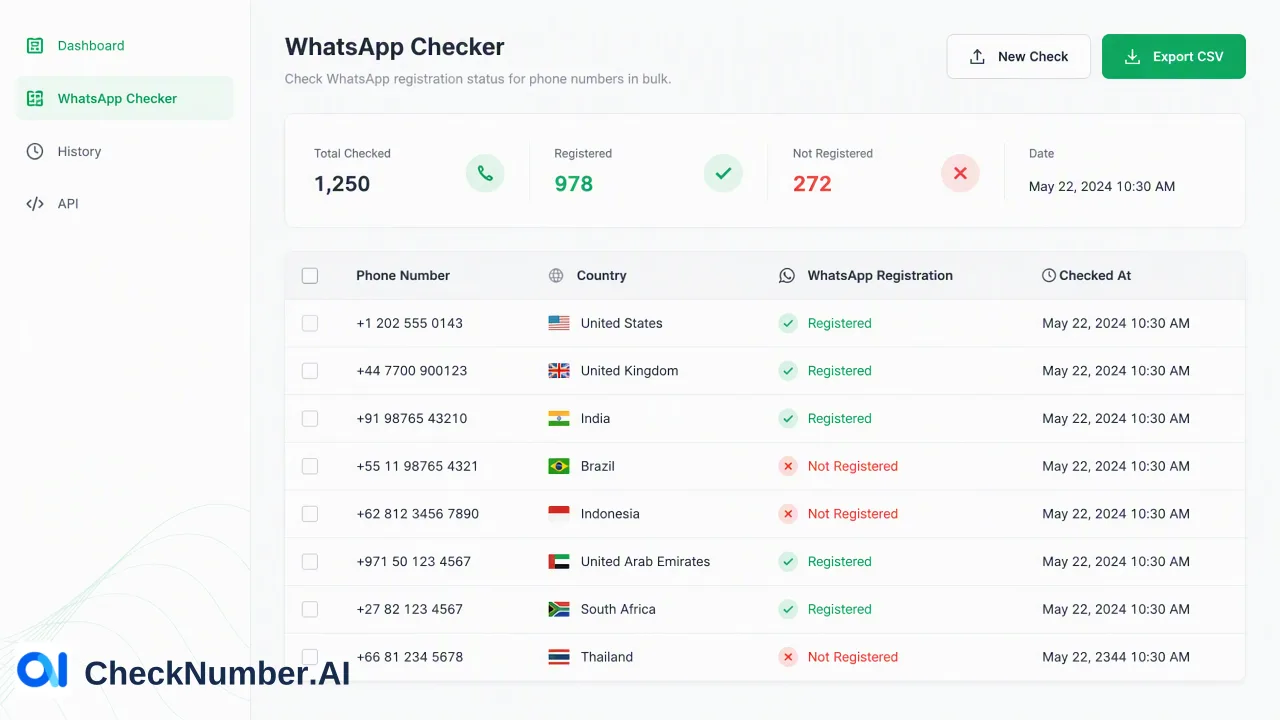
To check WhatsApp number registration in bulk, organizations can use CheckNumber.AI to process lists via CSV or TXT file uploads. This workflow identifies platform-related account signals for each number in a list. By automating this process, businesses can efficiently categorize their data based on platform presence, supporting internal data management and organizational workflows.
Understanding Platform Registration Signals
When managing large datasets of contact information, organizations often need to determine which phone numbers are associated with specific platforms. A platform registration signal indicates account-related presence for the named product at the time of the check. In the context of a WhatsApp online checker, this signal confirms whether a specific phone number is registered with a WhatsApp account. It is important to distinguish this from basic format checks. While a format check only verifies that a phone number aligns with standard numbering plans and structural rules, a platform registration check provides a specific account-related indicator for the platform in question. By identifying this platform presence, teams can categorize their records more accurately. This categorization serves as a foundational step for internal data management, allowing organizations to segment their lists based on documented platform registration signals rather than relying on assumptions about the data.
Preparing Data for Bulk Processing
Before initiating a bulk check, teams must format their data to align with the supported input methods. Bulk workflows support CSV or TXT list uploads, making it straightforward to handle large volumes of phone numbers simultaneously. To prepare a list for a WhatsApp online checker, organizations should compile their phone numbers into a single column within a CSV file or as a line-by-line list in a plain TXT document. Standardizing the phone numbers before upload helps streamline the process. While the core workflow is bulk checking of supported phone-number lists, ensuring the data is cleanly formatted reduces processing friction. By utilizing CSV or TXT formats, businesses can extract data from their existing customer relationship management systems, databases, or spreadsheets, consolidate the numbers, and prepare them for efficient batch processing without requiring complex data transformations.
Executing the Bulk Check Workflow
The execution phase involves submitting the prepared data to CheckNumber.AI. The core workflow is bulk checking of supported phone-number lists, which can be accomplished through multiple supported methods. For manual batch processing, teams can upload their CSV or TXT files directly through the platform interface. Once uploaded, the system processes the list to identify the platform registration status for each entry. For organizations requiring programmatic execution, bulk workflows support REST API access. This allows technical teams to integrate the checking process directly into their internal backend systems or data pipelines. Using the REST API access method, businesses can automate the submission of phone number lists, facilitating seamless data management workflows that operate alongside other internal processes. Whether utilizing file uploads or API integration, the workflow is designed to handle bulk data efficiently.
Interpreting and Exporting Results
After the bulk checking process concludes, the system generates an output detailing the platform-related signals for the submitted numbers. Interpreting these results correctly is crucial for effective data management. The output categorizes each phone number based on its account-related presence on WhatsApp. Teams can export these results, typically back into a CSV format, to review the categorized data. This exported list provides a clear distinction between numbers that returned a positive platform registration signal and those that did not. Organizations can then use this categorized data to inform internal decisions and support prioritization. By understanding which numbers possess an account-related presence, teams can update their internal databases, refine their contact lists, and ensure their records accurately reflect the current platform registration status of the phone numbers in their systems.
Integrating the Workflow into Organizational Processes
Incorporating a WhatsApp online checker into broader organizational processes helps teams maintain organized and categorized records. The platform registration signal acts as one input alongside other internal checks and data validation steps. For example, when auditing a large database, identifying platform presence supports the review process by highlighting which records are associated with the platform. This information contributes to data segmentation strategies, allowing teams to group records based on specific criteria. By establishing a standardized workflow for bulk checking—from data preparation via CSV or TXT files to execution via REST API or manual upload, and finally to result interpretation—organizations can systematically manage their data. This structured approach ensures that internal teams have access to clear, documented platform signals to support their ongoing data management and operational workflows.
FAQ
What does a WhatsApp registration signal indicate?
A platform registration signal indicates account-related presence for the named product at the time of the check. It helps organizations identify whether a specific phone number is registered with a WhatsApp account, supporting internal data categorization.
What file formats are supported for bulk workflows?
Bulk workflows support CSV or TXT list uploads. Teams can compile their phone numbers into these standard file formats to process large lists efficiently.
Can technical teams automate the bulk checking process?
Yes, bulk workflows support REST API access. This allows technical teams to integrate the checking process programmatically into their existing internal systems and data pipelines.
How does bulk checking differ from individual number checks?
The core workflow is bulk checking of supported phone-number lists, which allows organizations to process large volumes of data simultaneously via CSV, TXT, or REST API, rather than manually querying numbers one by one.