CheckNumber.AI
 · 9 min read
WhatsApp Number Validator vs Phone Number Validator: Two Different Checks
A comparison of what a WhatsApp registration check and a phone number validity check each tell a team, and how to combine them in one list workflow.
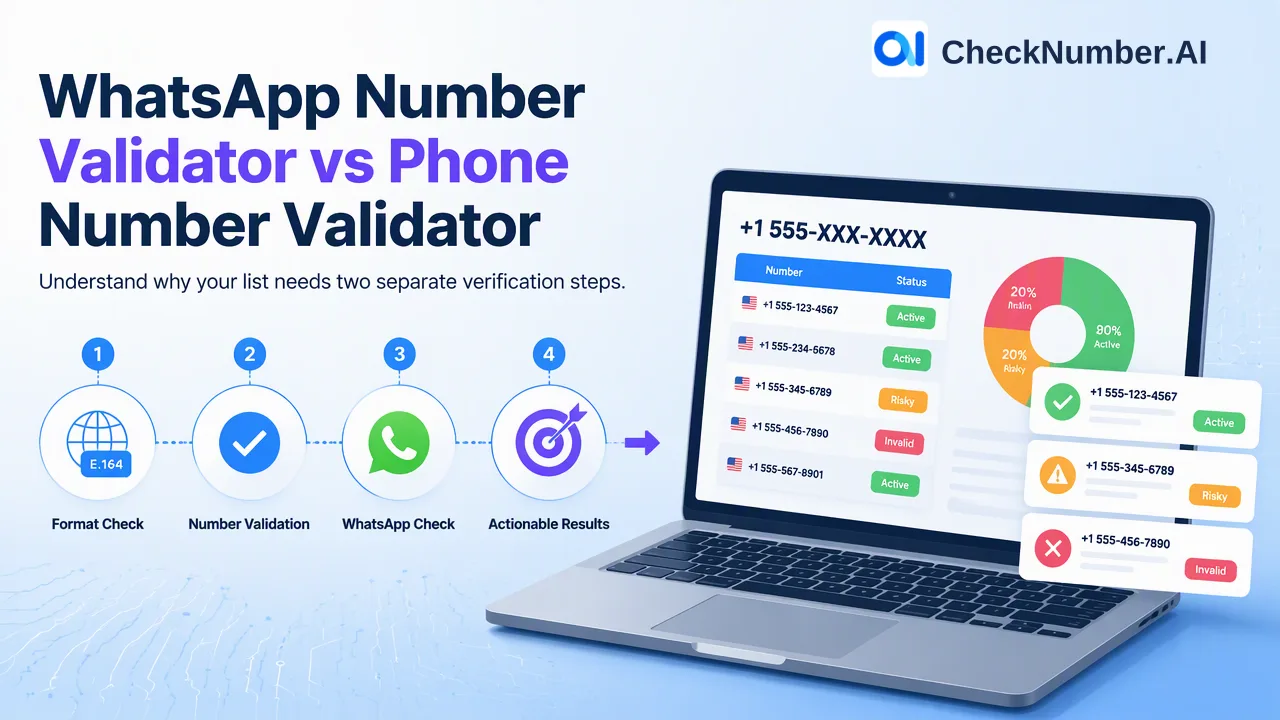
A WhatsApp number validator and a phone number validator are not interchangeable. A phone number validator asks whether a number is well formed or valid as a phone number, while a WhatsApp number validator asks whether the number is registered on WhatsApp at the time of the check. A number can pass the first question and fail the second, so lists that feed WhatsApp outreach usually need the general check first and the platform check second.
Why the two terms get mixed up
Search results for “whatsapp number validator” mix several different kinds of tools under one label. Some are open-source scripts that ask the user to scan a QR code and run numbers through a personal WhatsApp session. Some are hosted checkers or APIs that test whether a number is registered. Others are general phone validators that only look at format, country and line type, and then add a “WhatsApp-ready” style flag that is inferred rather than confirmed. The label is the same, but the question being answered is different in each case.
For a team that owns a contact list, the practical issue is simple: the word “valid” can mean several things. Valid as a string of digits, valid as a number in a numbering plan, valid as an active line, or registered with a messaging platform. Each of those is a separate question with a separate kind of evidence, and each belongs to a different step in list preparation. Treating them as one check is the most common reason a cleaned list still produces poor results in a channel.
What a phone number validator answers
A general phone number validator looks at the number itself. The usual outputs are whether the number is valid or possible for its country, which country calling code applies, and how the number can be written in a standard form. Many open tools build on the public libphonenumber library for this kind of parsing, and the international numbering format they target is defined in the ITU recommendation E.164.
On the dashboard side, the free Number Cleaner covers this preparation step: it normalizes phone numbers to E.164 and removes duplicates and invalid entries before a paid check. That is a different job from a platform check. It tidies the list so that later checks receive numbers in a consistent shape, and it avoids spending checks on rows that were never going to resolve.
The dedicated phone validity product answers a separate question about whether a number is valid, using its documented validity signal. A validity signal can support list hygiene, but it does not guarantee that a message will be delivered, that anyone will respond, or who owns the number.
What a WhatsApp number validator answers
A WhatsApp registration check answers a narrower and more channel-specific question: was this number registered on WhatsApp when the check ran. That is a platform-specific reachability and deliverability signal at check time. It is useful because it separates the numbers where WhatsApp is a realistic channel from the numbers where it is not, which helps a team decide what to send through WhatsApp and what to route elsewhere.
The result is deliberately limited. A registration signal is not proof of identity, ownership, consent or intent to reply. WhatsApp’s own business messaging policy places the consent requirement on the business, so a registered number still needs prior opt-in before outreach. Teams should treat the registration signal as one input into a channel plan and keep their consent records separate.
The dedicated WhatsApp activity product is a different product again. Its fields describe days since last online, which supports prioritizing a list. That capability belongs only to the activity product and should not be assumed from a plain registration check.
Side-by-side comparison
| Question | Phone number validator | WhatsApp number validator |
|---|---|---|
| What does it examine? | The number: format, country, validity | The number against WhatsApp registration at check time |
| Typical use | Cleaning and standardizing a list before any check | Splitting a list into WhatsApp and non-WhatsApp segments |
| Can a pass mislead? | A valid number may not be on WhatsApp | A registered number may still not have given consent |
| Does it prove identity or consent? | No | No |
| Where it fits in the workflow | First step | Second step, after cleaning |
Read the table by rows rather than by columns. The first row is the one most often misunderstood: the two tools are looking at different things. The phone validator inspects the number; the WhatsApp validator inspects the number’s relationship to a platform. Neither replaces the other.
Why a valid number may not be on WhatsApp
Many numbers are perfectly valid and still never appear as registered on WhatsApp. A valid number only says that the number is well formed and belongs to a plausible numbering range. Whether the person behind it installed WhatsApp, chose a different messaging app, or uses the number only for calls is a separate fact that format rules cannot see.
The reverse mistake also happens in lists. A team sees a high share of valid numbers after cleaning, assumes the list is ready for WhatsApp, and discovers only after sending that a large part of it is not registered. Running the registration check before a campaign moves that discovery to the planning stage, when the team can still choose another channel for those rows.
For numbers that return an undetermined or non-registered result, the sensible default is to keep them in a separate segment rather than delete them. They may belong to a different channel, and a later re-check can change the answer because registration is only a statement about the moment of the check.
A practical order of operations for a list
A reliable sequence keeps each check responsible for one question.
- Normalize first. Open the free dashboard Toolbox, run Number Cleaner on the raw export, and keep the E.164 output. Remove duplicates and invalid entries before paying for any check.
- Split by country. Phone-list uploads use one country per file and one number per line with the country code; the plus sign is optional. Mixed-country lists should be divided into one file per country before upload.
- Upload a supported file. Bulk workflows accept CSV or TXT uploads, and supported bulk products are also available through REST API access for teams that want the check inside their own systems. For API specifics, use the current API documentation rather than assumptions.
- Run the WhatsApp registration check. Use the dedicated WhatsApp product for registration, and add the activity product only when days since last online would help prioritize the list.
- Export and segment. Checker-specific results can be exported for customer-controlled review, so the registered segment can go to the WhatsApp plan while the rest follows other channels.
- Record consent separately. Keep opt-in evidence in the CRM, not in the check output.
Note that phone-number products do not cover China mainland, and Hong Kong, Macau and Taiwan are unsupported for phone-number products except LINE. Confirm any other region against the selected product’s current country selector before uploading.
When a team needs both checks
A team needs both checks when the list is large, imported from several sources, or headed for a WhatsApp campaign. Cleaning removes the rows that would only add noise. The registration check then answers the channel question on a list that is already consistent.
A team can often skip one of them. A small list of numbers collected from a fresh opt-in form may need only the registration check, because the numbers were typed recently and are probably in good shape. A list built for SMS or calling may need only validity and carrier information, because WhatsApp is not part of the plan.
A useful judgment rule: choose the check by the decision it informs. If the decision is whether a number is worth keeping in the CRM, a validity-style check helps. If the decision is whether to include a number in a WhatsApp send, a registration check helps. If the decision is which contacts to approach first among registered ones, an activity signal helps, and only where that product is used.
Common mistakes when comparing validators
- Treating a “WhatsApp-ready” flag as a registration result. Some tools infer readiness from line type. Read the tool’s documentation to see whether it queries registration or only estimates it.
- Using a personal WhatsApp session for list checks. Session-based tools tie the work to an individual account, which can create account risk for the person who scanned the code. An upload-based workflow keeps list checks separate from any personal account.
- Merging outputs from different products into one schema. Each checker returns its own signals. Keep results labelled by the product that produced them and do not assume the columns line up.
- Reading registration as consent. Registration says nothing about whether a person agreed to be contacted.
- Deleting non-registered numbers. Those numbers may still be reachable through SMS, email or another platform, so segment them instead of dropping them.
FAQ
What is the difference between a WhatsApp number validator and a phone number validator?
A phone number validator inspects the number itself, such as whether it is valid and how it should be formatted. A WhatsApp number validator checks whether the number was registered on WhatsApp at the time of the check. They answer different questions, so passing one does not imply passing the other.
Can a valid phone number still be missing from WhatsApp?
Yes. Validity describes the number, not the platform. A valid number may belong to someone who does not use WhatsApp, so a registration check is the step that separates WhatsApp-reachable numbers from the rest.
How can teams use both checks in one workflow?
Normalize and deduplicate the list first, split it into one file per country, upload it as CSV or TXT, run the WhatsApp registration check, and export the result for segmentation. The cleaning step prepares the list and the registration step decides channel fit.
Does a registered WhatsApp number mean the contact agreed to receive messages?
No. Registration is a platform signal at check time. Consent has to be collected and recorded separately, and WhatsApp’s business policy places that responsibility on the sender.