CheckNumber.AI
 · 7 min read
Telegram Username Checker: Checking a List of Usernames in Bulk
A practical guide for teams that hold Telegram usernames rather than phone numbers and need to check a whole list for registration and available public profile context.
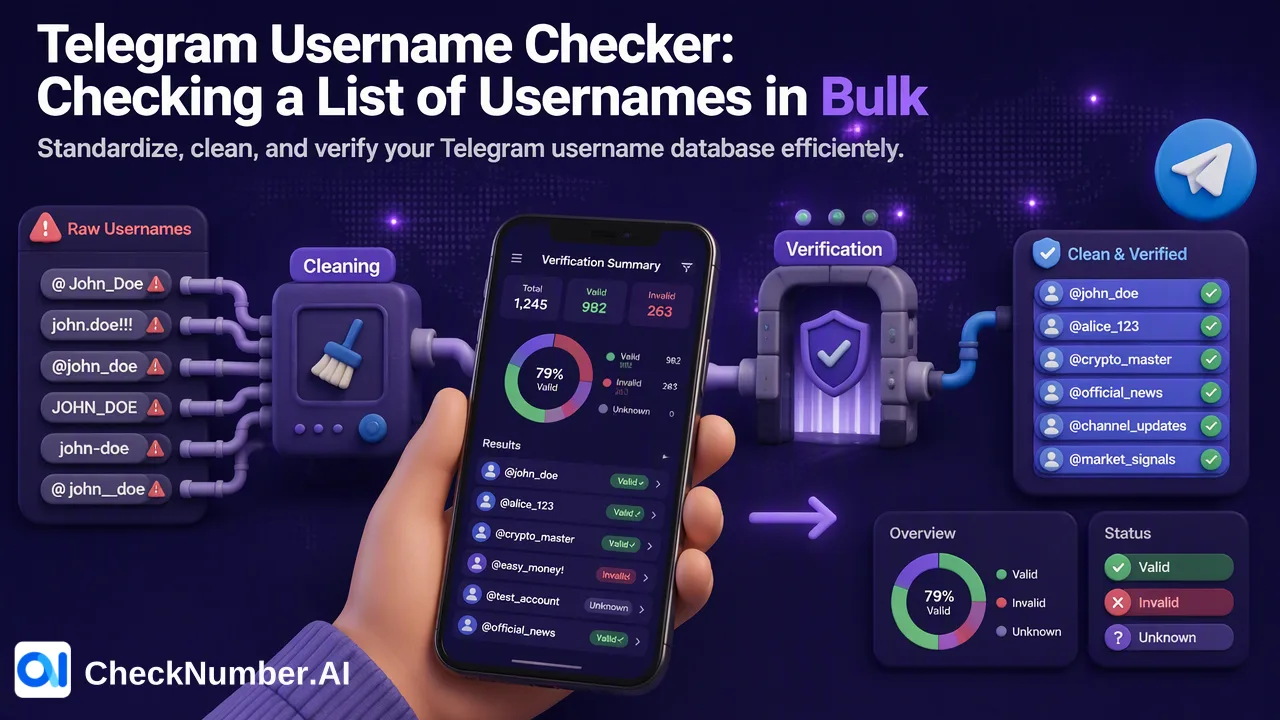
A Telegram username checker for a team is a list-level tool: it takes the usernames the team already holds and returns a Telegram registration signal for each one at check time. Most search results for this phrase are availability tools for people who want to claim a new handle, which answer a different question. Teams with a CRM column, an event sign-up sheet or a community export full of handles need a bulk check that returns exportable results they can review and segment.
Two different jobs behind the same search
The phrase “telegram username checker” covers two jobs that rarely overlap.
Availability checking. A person or brand wants a new handle and asks whether it is free. Telegram’s own API exposes a method for this, account.checkUsername, which reports whether a name is valid and unoccupied, and returns a separate error when a name can be purchased on Fragment. Most open-source scripts and marketplace tools in the top results wrap this method or a Fragment lookup, and they run on the operator’s own Telegram account.
List checking. A team already holds handles collected through sign-up forms, partner lists or community tools, and wants to know which of them correspond to registered Telegram accounts, so it can plan channels and clean records. That is a data-quality task, not a naming task.
The top-ranking pages focus almost entirely on the first job. They say little about preparing a list, choosing which signals to request, or what to do with each result category. The rest of this guide covers that second job.
When teams hold usernames instead of phone numbers
Telegram lets people use the service without sharing a phone number. The Telegram FAQ describes a username as an optional public handle that others can use to find and message an account through a t.me link, while the phone number stays private by default. As a result, many datasets contain handles but no numbers:
- Community and event sign-ups where people type their Telegram handle instead of a phone number.
- Partner or affiliate lists that identify contacts by handle.
- Support and sales records where a conversation started from a t.me link.
- Web3 and creator programmes where a handle is the primary contact field.
For these lists a phone-number check is not an option, because there is no number to check. A username-based product is the matching tool.
Which CheckNumber.AI product fits a username list
Two dedicated products accept Telegram usernames as input. Keep their outputs separate from the phone-number Telegram products and from each other.
| Product | Input | High-level capability |
|---|---|---|
| Telegram Username Registration Checker | Usernames | Checks whether usernames are registered with Telegram |
| Telegram Username Profile Checker | Usernames | Checks registration plus available public profile information, including avatar data when available |
A practical way to choose:
- Use the Registration Checker when the question is coverage: which handles in the list resolve to Telegram accounts at check time, so records can be cleaned and channels planned.
- Use the Profile Checker when a reviewer also needs the public profile context that is available for each handle, for example to support manual review of a smaller, prioritised segment.
Profile-related output belongs only to the Profile Checker. Treat any AI-inferred attributes it returns as estimates for segmentation, not as confirmed facts about a person, and expect that some handles will have no usable public avatar.
How to prepare a username list before checking
Handle lists collected from forms are messier than phone lists. A short cleanup pass makes the results easier to read.
- Pull the handles into one column. Export from the CRM or form tool and keep the original record ID next to each handle so results can be matched back.
- Standardise the form. People enter handles as
@name,t.me/name, fullhttps://t.me/nameURLs or plainname. Store one consistent form in the team’s own data, then follow the product’s current upload guidance for the exact format it expects. - Apply Telegram’s naming rules. According to the API documentation, usernames use Latin letters, digits and underscores and are 5 to 32 characters long. Entries outside those rules, such as handles with spaces or other scripts, are typing errors to fix or set aside.
- Remove duplicates case-insensitively. Telegram treats usernames as case-insensitive, so
Alex_Teamandalex_teamare the same handle. - Separate obvious non-handles. Phone numbers, email addresses and channel invite links pasted into the username field belong in their own lists and their own checks.
- Save the file as CSV or TXT. Bulk workflows support both formats, as well as REST API access for supported products.
How to run the check and read the results
Upload the prepared file to the selected username product, or send it through the REST API if the team automates list checks. API details, endpoints and applicable limits are described in the current API documentation, which is the reference for integration work.
When results are ready, export them and join them back to the source records by ID. Then work through three groups:
- Registered. The handle resolved to a Telegram account at check time. This is a platform-specific reachability signal that helps the team decide whether Telegram belongs in the channel mix for that record.
- Not registered. No account was returned for that handle at check time. Common reasons include a typo at entry, a handle that was later changed or released, or a value that was never a real handle. Review the original entry before discarding the record.
- Undetermined or empty rows. Keep them as a separate segment and re-check later instead of merging them into either group.
Record the check date and the product used in the export. Handles can be changed or removed, so a result describes the moment of the check, and a dated file makes later reviews straightforward.
Putting the results to work
The export becomes useful once it changes how the team handles records.
- CRM hygiene. Flag handles that did not resolve so the owner can confirm them at the next touchpoint, for example by asking the contact to re-enter the handle in a preference centre.
- Channel planning. Use registered handles to size a Telegram segment, and plan email or other channels for the remainder.
- Review queues. For partner or affiliate onboarding, route records with unresolved handles to a reviewer instead of accepting or rejecting them automatically.
- Outreach rules. Contact only people who have given prior express and informed consent, and follow Telegram’s Terms of Service, which prohibit spam and unsolicited promotional messages.
Re-run the check before each major campaign or review cycle rather than relying on an old export.
Common mistakes with username lists
- Using an availability tool on a contact list. Availability tools answer whether a name is free to claim and often run on a personal account. They are built for a different job and produce no structured export for review.
- Mixing handles and phone numbers in one file. Each input type has its own products. Split the list first.
- Ignoring case and prefixes. Without standardisation, the same handle appears several times and inflates the list.
- Merging outputs from different products. Registration results and profile results come from different products. Keep separate columns and note which product produced each one.
- Keeping results indefinitely. A handle registered last quarter may have been renamed since. Date every export and refresh it.
FAQ
What is the difference between a Telegram username availability checker and a registration checker?
An availability checker tells a person whether a handle is free to claim. A registration checker takes handles a team already holds and returns, for each one, whether it resolved to a Telegram account at check time, with results the team can export and segment.
How can teams check Telegram usernames in bulk without writing scripts?
Prepare a CSV or TXT file of standardised handles and upload it to a dedicated username product in the dashboard. Teams that want automation can use REST API access for supported products and follow the current API documentation for details and limits.
When should the Profile Checker be used instead of the Registration Checker?
Use the Registration Checker for list coverage and CRM cleanup. Use the Profile Checker when reviewers also need the public profile information that is available for each handle, such as avatar data, and treat any inferred attributes as estimates.
How should teams handle usernames that come back as not registered?
Check the original entry for typos or prefixes first, then flag the record for confirmation at the next contact point. Keep undetermined rows as a separate group and re-check them later instead of deleting them.