CheckNumber.AI
· 5 min read
Viber Number Checker for a Customer List: Choose the Messaging Route
A Viber registration check can inform customer-list planning, while subscription and permission records determine which messaging route is available.
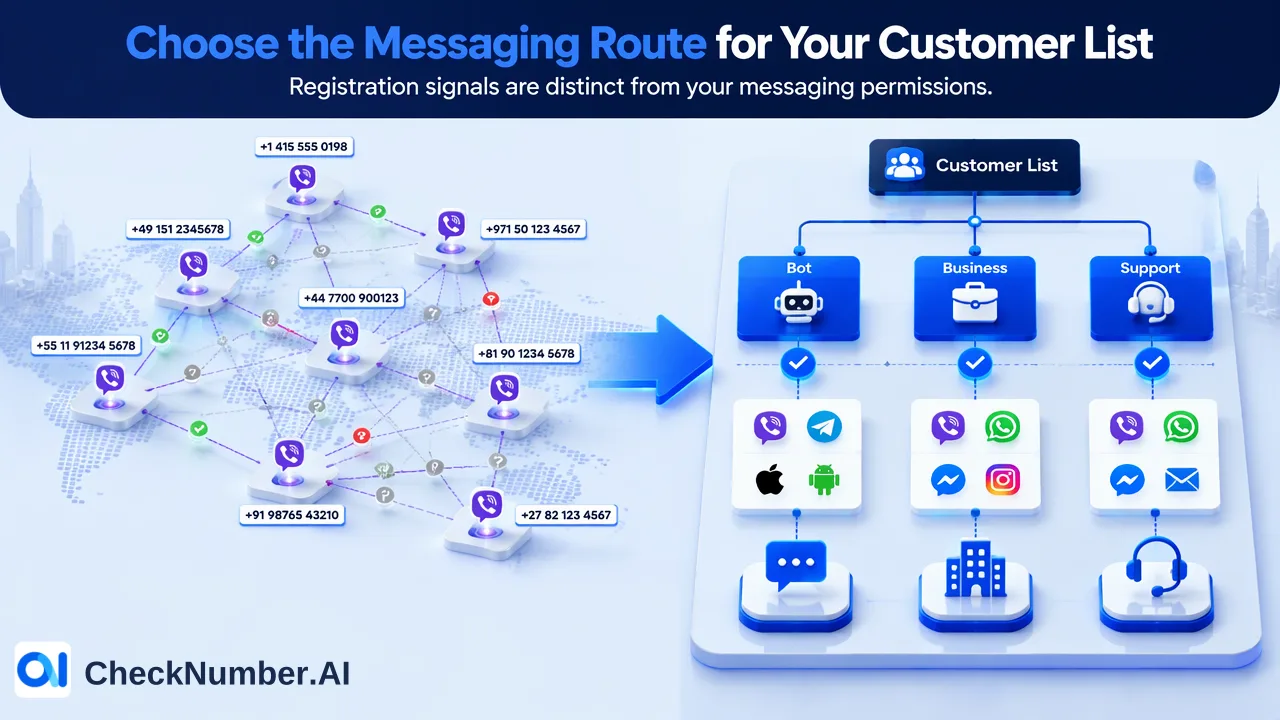
If you already have a customer phone list and want to use Viber, choose the messaging route before treating a registration check as a send list. CheckNumber’s Viber Checker can assess whether supplied numbers show a Viber registration signal. That observation can help you plan the audience, but it does not show that a person subscribed to your chatbot or gave your business permission to message them. Match the result to the customer record, then use your own subscription and permission data to decide the next step.
Start with the customer task, not the phone file
A service team may want to answer a known customer’s question in Viber. A marketing team may want to send an update to a group that already follows its chatbot. A retailer may be evaluating Viber Business Messages for service notifications to customers who supplied phone numbers. These are different starting points even if the same customer spreadsheet sits on a shared drive.
For a one-to-one contact already known to an employee, Viber’s own contact guidance describes finding and adding contacts inside the app. That personal contact flow is not a company-wide screening or business messaging program. For a chatbot audience, Viber’s chatbot FAQ describes chatbot-initiated messages to subscribers. A phone number appearing in your CRM is not by itself a bot subscription. For a phone-number-based business route, Viber Business Messages is a separate product described in channel documentation. The business still has to establish its eligible audience and meet the route’s current requirements.
Write down the actual task first: a support conversation, a subscriber update, or a business notification. Then identify which system holds the relevant relationship. That keeps a positive registration observation from being mistaken for every kind of Viber reachability.
Use Viber Checker for the question it answers
CheckNumber’s Viber Checker is a list-oriented phone-number registration-signal product. Given an existing, authorized list, it helps you assess which supplied numbers appear registered on Viber at the time of the check. It is separate from CheckNumber’s Viber Days activity product and Viber Avatar enrichment. Do not expect a registration result to supply subscriber history, customer intent, or a sending authorization.
A practical input starts with records you already hold. Keep your customer ID and original number alongside a working copy prepared for the check, then join the returned observation to the correct source row. CheckNumber supports CSV or TXT bulk phone-list workflows. Confirm the selected Viber product’s current country coverage before preparing the file; products can differ. For phone uploads, keep one country per file and one number per line with country code, with or without the plus sign. Those mechanics protect the join, but the business decision still rests on the route and the customer relationship.
The result is useful for planning. If a number shows a Viber registration signal, you can distinguish it from a number that does not when estimating which records need further route review. If a result is unavailable or cannot be matched back confidently, leave it unresolved rather than labeling the customer as absent. None of these categories is a permission flag.
Match a registered number to the right Viber route
Consider a team with 2,000 customer rows and a planned order update. Its first question is whether the business has a suitable route for that message. If customers have already subscribed to its chatbot, the team can compare those subscriber records with its eligible order audience. A CheckNumber registration result may add context about the phone list, but it cannot turn a non-subscriber into a chatbot subscriber. If the team is considering Viber Business Messages, it should review that product’s phone-number-based onboarding, message type, and permission requirements with its messaging provider. Registration screening is an input to that assessment, not the provider setup.
The person using a Viber app to speak with one known customer is making a narrower contact decision. A bulk export should not be treated as an instruction to add or message everyone through an individual app. Even a number that is registered may belong to a record that was collected for another purpose, has opted out, or lacks the context needed for this particular message. Use the customer’s current consent and suppression records for that decision.
This separation is also a useful answer to the apparently simple question “How many of our customers are on Viber?” The registration check can help describe a subset of submitted phone numbers. The number who can receive a particular bot update or business notification depends on a different set of route and audience records. Report those counts separately rather than presenting one registration count as a sendable audience.
Turn the check into a next-step file
After the Viber check, create a customer-side working file with the original customer ID, submitted phone number, check date, observed registration category, chosen messaging route, and your own permission or subscriber status. These are suggested columns in your workflow, not a promised CheckNumber export schema. Keep uncertain or unmatched results visibly separate. If a customer has changed phone numbers, do not attach an old observation to the new number merely because the customer ID matches.
Route the rows by the next decision. A registered number with the required subscriber relationship can move to the team’s chatbot audience review. A registered number considered for Business Messages can move to provider and permission review. A customer whose request is being handled personally may remain in the existing support conversation. A number without a usable registration observation needs a different contact plan or a later check; it should not be silently counted as a Viber target. In every case, existing opt-outs and customer preferences stay with the source record.
To begin, browse CheckNumber’s products and select Viber Checker for the registration question. Keep the messaging route decision beside the check result, not inside it. That lets the team use a list signal for planning without confusing it with a subscription, a right to contact, or a delivered message.