CheckNumber.AI
· 4 min read
Why Telegram Username Profile Results Can Have Empty Fields
A positive registration observation and unavailable profile details answer different questions in a CheckNumber export.
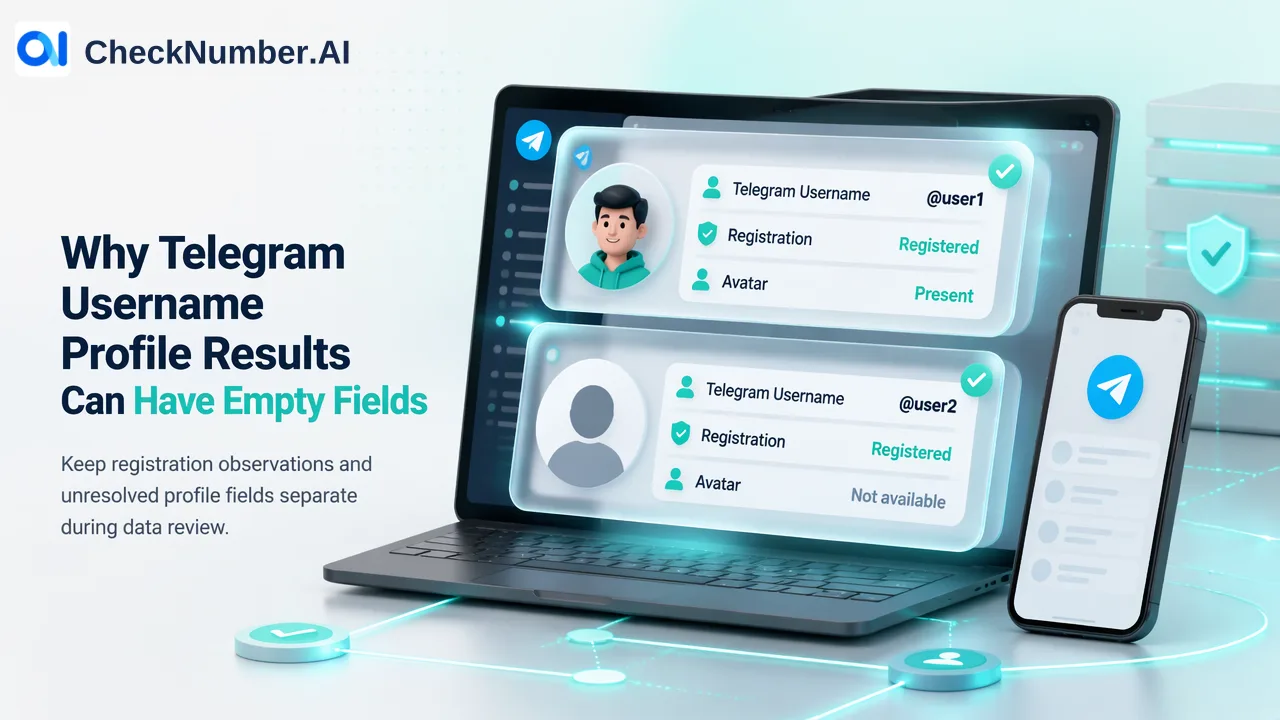
A Telegram Username Profile row can show that a username is registered while its later profile fields remain empty. Our Profile documentation explains that extraction requires a public avatar: without one, the task stops after registration. Keep the registration observation and the unresolved fields separate when you review the export.
Read the registration result on its own
Imagine a customer operations team checking an authorised list of Telegram usernames before cleaning its contact records. One row shows a registration result, but the avatar and subsequent columns are blank. The temptation is to treat the whole row as failed, or to fill the blanks with assumptions from an older record. Neither follows from the export.
The activated result addresses registration for the submitted username at check time. The later Profile values address information the Profile task could extract. Those are separate observations. Preserve the original username and the returned registration result, together with the date of the check, even when the rest of the row is unresolved. This lets colleagues answer the narrow registration question without pretending they received a complete profile.
CheckNumber offers different Telegram username tasks. Profile is the task relevant to this export; an Activity task should not be used as a substitute explanation for a Profile row. Work from the columns in the actual task export and its current documentation rather than merging labels across products.
Understand the public avatar gate
Our Telegram Username Profile documentation explains the important condition: Profile extraction requires a public avatar. An account without a usable public avatar stops after registration, so later activity and profile columns can remain empty. That is why a row can contain a registration observation without offering an avatar URL or further profile information.
Telegram lets people restrict who can see their profile photo and set a separate public photo. This helps explain why photo visibility varies, but it does not identify the reason for any particular blank row. A missing public avatar, an unavailable result, and a customer’s own data quality problem are not facts you can distinguish merely by looking at an empty cell. Avoid writing a guessed privacy setting into the customer record.
The export may include fields such as avatar, activity and inferred appearance attributes. Treat empty values as unavailable in this check. Where an inferred attribute does appear, it remains an estimate, not a verified statement about the person’s identity or age. Registration also does not establish who controls the username today or whether that person wants contact.
Keep a reviewable customer record
For an authorised username list, keep the source row identifier alongside four human-readable pieces: the submitted username, the registration observation, the check date, and a profile-detail status such as “not available in this export.” This status is your own review label; it is not a value we claim the API returns. Retain the original export if your team needs to audit which cells were actually present.
Suppose the team has two usernames tied to separate service tickets. The first has a registration observation and several later values. The second has the same registration observation but empty later cells. Both can be tagged as registered at the time checked. Only the first supplies the particular profile details shown in its row. Do not copy those details to the second ticket, and do not delete the second registration result merely because its profile is sparse.
If a decision truly requires more information, route the row to a manual review that uses your existing customer relationship and authorised sources. Ask what decision depends on the missing data. If the work is only to remove clearly unregistered handles from an internal list, a profile inference may be unnecessary. If the work needs a specific customer identity, this export alone is the wrong basis for declaring one.
Start by reviewing a small set of rows with both populated and empty Profile columns. Agree on the meaning of each customer-defined review label, then apply it to the wider export. The resulting list will distinguish what CheckNumber observed from what your team still needs to establish.