CheckNumber.AI
 · 5 min read
How to Filter Signal Contacts by Interaction History: A Practical Workflow
Learn how teams screen Signal contact lists by combining bulk platform registration checks with internal interaction records to refine outreach workflows.
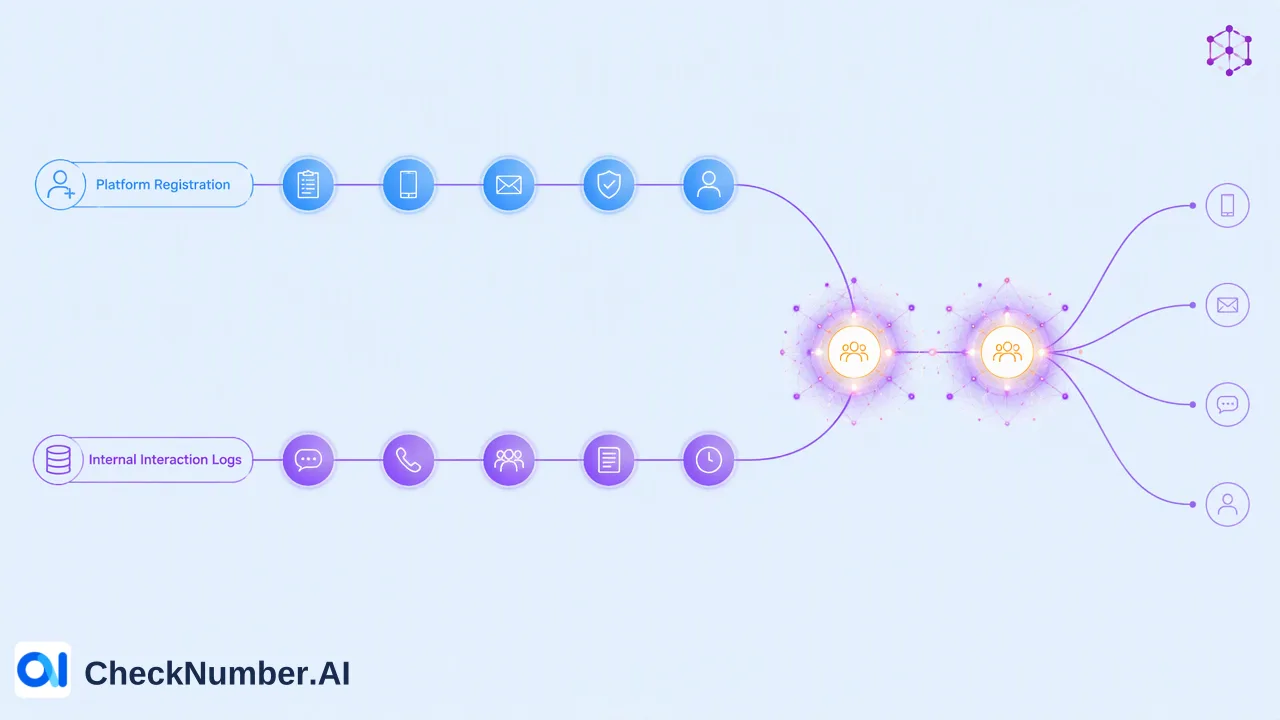
Signal contact interaction screening combines check-time platform registration signals with internal engagement records to help teams organize communication lists. By pairing bulk registration screening with historical interaction logs, organizations can segment audiences, suppress dormant numbers, and direct resources toward responsive recipients.
The Limitation of Relying Solely on Platform Registration
Verifying that a phone number exists on a messaging network is an essential baseline, but treating registration as a complete qualification metric introduces inefficiencies. Phone numbers can remain registered on messaging platforms long after an individual has stopped monitoring notifications or switched to alternative channels. CheckNumber.AI provides a dedicated Signal Checker that evaluates whether phone numbers are registered with Signal. When marketing or operations teams assume that every registered contact is an active recipient, outreach performance metrics can become distorted. High delivery counts paired with low response rates often stem from messaging accounts that exist technically but are functionally dormant.
Understanding Interaction-Based Screening
Interaction-based screening layers internal engagement records over platform presence data. Rather than evaluating a contact list solely by whether numbers are reachable on Signal, teams incorporate internal telemetry—such as previous customer service conversations, click-through actions, inquiry recency, and purchase history—to gauge contact readiness. This distinction helps teams build more nuanced audience tiers:
- Unregistered records: Numbers that return no registration record on Signal during screening. These should be routed to alternative channels or suppressed from messaging workflows. - Registered but cold contacts: Numbers confirmed on the platform that show zero logged interactions over an extended observation window (e.g., 90 to 180 days). - Registered and active contacts: Numbers confirmed on the platform that demonstrate recent interactions, inbound queries, or verified engagement within internal operational databases. By categorizing contacts into these operational tiers, organizations avoid expending resources on accounts that are technically reachable on the platform but unlikely to engage.
Step-by-Step Screening and Segmentation Workflow
Implementing a structured screening pipeline prevents dirty contact data from degrading campaign quality. A standard multi-stage workflow includes the following steps:
- Data Normalization and Separation: Clean the raw phone number list by removing formatting anomalies and applying consistent country-code standards. Separate net-new outbound leads from existing contacts that already possess internal interaction history. 2. Bulk Registration Verification: Submit the normalized list for bulk checking. CheckNumber.AI supports list processing through CSV or TXT file uploads, as well as REST API access for integrated systems. The Signal Checker returns account presence signals for each submitted number. 3. Channel Routing for Unregistered Numbers: Extract numbers that are not registered on Signal. Route these records to alternate channels such as email or telephony, preventing delivery failures on messaging pipelines. 4. Engagement History Cross-Referencing: Take the confirmed Signal registrations and join them with internal CRM activity logs. Tag contacts by their most recent interaction timestamps. 5. Audience Segmentation: Group the remaining verified records into high-priority active cohorts and low-priority dormant cohorts based on interaction recency. | Workflow Stage | Primary Input | Operational Action | Expected Output | | :--- | :--- | :--- | :--- | | 1. Normalization | Raw phone list | Format phone numbers; isolate historical records | Clean phone list separated by data source | | 2. Bulk Check | Normalized phone list | Run bulk check via CSV, TXT, or REST API | Check-time Signal registration status | | 3. Channel Filter | Unregistered records | Suppress from Signal outreach; re-route to alternate channels | Cleaned roster of platform-confirmed numbers | | 4. Interaction Join | Verified Signal numbers | Match against internal CRM logs and interaction history | Enriched list with recency tags | | 5. Campaign Tiering | Enriched list | Divide into active engagement tiers vs. re-engagement pools | Final segmented outreach rosters |
Why Interaction Screening Informs Campaign Performance
Separating active interactors from dormant registrations helps marketing and support teams conduct clearer campaign testing. When creative messaging or transactional announcements are broadcast to a raw list of registered accounts, response rates are diluted by inactive recipients. This makes it difficult to assess whether poor performance is caused by message content or by disengaged audience members. Focusing message rollouts on contacts with verified recent interaction history provides a clearer signal during testing. Teams can accurately measure conversion, click rates, and response times within an engaged sample before expanding outreach to colder audience segments. Furthermore, filtering out dormant accounts helps organizations preserve operational bandwidth, maintain clean messaging queues, and support higher overall engagement across primary communication workflows.
FAQ
Why do organizations separate platform registration from interaction history?
A platform registration check is a point-in-time check that indicates whether an account is present on Signal. It does not measure how often a user opens the app, reads messages, or responds to inquiries. Interaction history, recorded in internal CRM or support systems, reflects actual behavioral engagement. Separating the two prevents teams from treating inactive accounts as active campaign targets.
How can teams organize high-volume lists before checking Signal registration?
Teams typically begin with phone number normalization to resolve international formatting across regional lists. Next, separating net-new records from historical contacts prevents redundant processing. Once the list is structured, bulk verification checks platform registration, allowing teams to isolate unregistered numbers before segmenting the remaining contacts against internal engagement metrics.
What data inputs are required for bulk Signal screening?
Signal screening requires standard phone number inputs. Organizations can process contact files via CSV or TXT list uploads, or query records programmatically using REST API access. The output confirms whether each submitted phone number has an active registration on the Signal platform at the time of the check.